 cagatayuresin
Production WordPress on K3s
A production-ready WordPress setup on K3s, with a Helm chart for fully automated SSL and a scalable architecture. How, and why?





Why K3s, and why this solution?
When it comes to deploying modern web applications, Kubernetes has become the industry standard. But setting up and running a full Kubernetes cluster can be complex and resource-heavy, especially for small and mid-sized projects. That’s exactly where K3s comes in.
This post is a deep dive into the production-ready Helm chart I built for running WordPress on K3s. You can find the GitHub repo here.
What is K3s, and why use it?
Advantages of K3s
K3s is a lightweight, production-ready Kubernetes distribution from Rancher Labs. It delivers the full Kubernetes experience at a fraction of the resource cost.
1. Minimal resource usage
- Standard Kubernetes uses 300MB+ RAM; K3s uses only ~50-150MB
- The binary is under 100MB (vs. 1GB+ for standard Kubernetes)
- Runs fine even on edge devices and low-spec servers
2. Easy install and management
curl -sfL https://get.k3s.io | sh -- A production-ready cluster in under 30 seconds
- Automatic TLS certificate management
- Single binary, easy upgrades
3. Built-in components
K3s ships by default with components you’d otherwise have to install separately on standard Kubernetes:
- Traefik: a modern reverse proxy and load balancer
- Local-path provisioner: automatic PersistentVolume management
- Service load balancer: integrated via Klipper-lb
- Flannel CNI: for container networking
4. Production-ready
- A CNCF-certified Kubernetes distribution
- Full Kubernetes API compatibility
- Every kubectl and helm command works
- ARM64 support (e.g. Raspberry Pi)
Disadvantages of K3s
Despite all these advantages, K3s isn’t the right fit for every scenario:
1. Limited plugin ecosystem
- Some enterprise Kubernetes add-ons may not be optimized for it
- Cloud-native integrations (EKS, AKS, GKE) aren’t as broad
2. Swapping out default components
- Using nginx-ingress instead of Traefik requires extra configuration
- SQLite is used instead of etcd (HA setups can switch to etcd)
3. Community and documentation
- The community isn’t as large as Kubernetes’ own
- Fewer resources for edge-case scenarios
4. High-availability complexity
- A multi-master HA setup needs extra configuration
- Requires embedded etcd or an external database
Why I built this Helm chart
WordPress still powers over 43% of the internet. But setting up a modern, container-based WordPress deployment kept running into a few recurring problems:
Problems I kept hitting
- Manual SSL certificate management: renewing Let’s Encrypt certificates by hand is time-consuming
- Scattered configuration: separate YAML files for WordPress, MySQL, and Redis
- Security concerns: passwords and secrets stored in plain text
- Persistence issues: data loss after pod restarts
- Lack of scalability: traffic spikes require manual intervention
My solution
A single Helm chart that solves all of these problems, designed to be production-ready:
helm install myblog wordpress-helm/ -f my-values.yamlQuick install
To get an SSL-secured WordPress site running on a fresh Ubuntu/Debian server in under 5 minutes:
One-shot script
DOMAIN="${1:-example.com}"
EMAIL="${2:-admin@example.com}"

echo "Starting K3s WordPress setup..."
echo "Domain: $DOMAIN"
echo "Email: $EMAIL"
echo ""

echo "Installing K3s..."
curl -sfL https://get.k3s.io | sh -
export KUBECONFIG=/etc/rancher/k3s/k3s.yaml
sleep 10

echo "Installing cert-manager..."
kubectl apply -f https://github.com/cert-manager/cert-manager/releases/download/v1.14.4/cert-manager.yaml
kubectl wait --for=condition=ready pod -l app=cert-manager -n cert-manager --timeout=300s

echo "Installing Helm..."
curl https://raw.githubusercontent.com/helm/helm/main/scripts/get-helm-3 | bash

echo "Fetching the Helm chart..."
cd /tmp
git clone https://github.com/cagatayuresin/awesome-k3s-wordpress-helm.git
cd awesome-k3s-wordpress-helm

echo "Generating secure passwords..."
MYSQL_ROOT_PASS=$(openssl rand -base64 32)
MYSQL_WP_PASS=$(openssl rand -base64 32)
REDIS_PASS=$(openssl rand -base64 32)

echo "Preparing configuration..."
cat > quick-values.yaml <<EOF
domain: $DOMAIN
enableWwwRedirect: true

letsencrypt:
  email: $EMAIL

mysql:
  rootPassword: "$MYSQL_ROOT_PASS"
  password: "$MYSQL_WP_PASS"

redis:
  enabled: true
  password: "$REDIS_PASS"

wordpress:
  replicas: 1
  resources:
    requests:
      memory: "256Mi"
      cpu: "250m"
    limits:
      memory: "512Mi"
      cpu: "500m"
EOF

echo "Deploying WordPress..."
helm install myblog wordpress-helm/ -f quick-values.yaml

echo "Waiting for pods to be ready..."
kubectl wait --for=condition=ready pod -l app=wordpress -n wordpress --timeout=300s

echo ""
echo "Setup complete!"
echo ""
echo "Important info:"
echo "━━━━━━━━━━━━━━━━━━━━━━━━━━━━━━━━━━━━━━━"
echo "Site URL: https://$DOMAIN"
echo "MySQL root password: $MYSQL_ROOT_PASS"
echo "WordPress DB password: $MYSQL_WP_PASS"
echo "Redis password: $REDIS_PASS"
echo ""
echo "Save these passwords somewhere safe!"
echo ""
echo "Status check:"
echo "  kubectl get pods -n wordpress"
echo "  kubectl get certificate -n wordpress"
echo ""
echo "Visit https://$DOMAIN to finish the WordPress setup"
echo "━━━━━━━━━━━━━━━━━━━━━━━━━━━━━━━━━━━━━━━"
Manual quick install (step by step)
If you’d rather go step by step instead of using the script:
curl -sfL https://get.k3s.io | sh -
export KUBECONFIG=/etc/rancher/k3s/k3s.yaml

kubectl apply -f https://github.com/cert-manager/cert-manager/releases/download/v1.14.4/cert-manager.yaml
kubectl wait --for=condition=ready pod -l app=cert-manager -n cert-manager --timeout=300s

curl https://raw.githubusercontent.com/helm/helm/main/scripts/get-helm-3 | bash

git clone https://github.com/cagatayuresin/awesome-k3s-wordpress-helm.git
cd awesome-k3s-wordpress-helm

cat > my-values.yaml <<EOF
domain: yourdomain.com
letsencrypt:
  email: your-email@yourdomain.com
mysql:
  rootPassword: "$(openssl rand -base64 32)"
  password: "$(openssl rand -base64 32)"
EOF

helm install myblog wordpress-helm/ -f my-values.yaml

kubectl get pods -n wordpress
kubectl get certificate -n wordpress
One-liner (if K3s is already installed)
If K3s and Helm are already in place:
git clone https://github.com/cagatayuresin/awesome-k3s-wordpress-helm.git && \
cd awesome-k3s-wordpress-helm && \
cat > my-values.yaml <<EOF
domain: yourdomain.com
letsencrypt:
  email: your@email.com
mysql:
  rootPassword: "change-me-$(date +%s)"
  password: "change-me-$(date +%s)"
EOF
helm install myblog wordpress-helm/ -f my-values.yaml
Post-install checks
kubectl get pods -n wordpress

kubectl get certificate -n wordpress

kubectl get ingress -n wordpress

kubectl logs -f deployment/myblog-wordpress -n wordpress
Expected timing
| Step | Duration |
|---|---|
| K3s install | ~30 seconds |
| cert-manager install | ~2 minutes |
| Helm install | ~30 seconds |
| WordPress deployment | ~1 minute |
| SSL certificate issuance | ~30-60 seconds |
| TOTAL | ~5 minutes |
Important notes
- DNS: your domain’s A record needs to point at your server’s IP
- Firewall: ports 80 and 443 must be open
- Root access: commands must be run as root or with sudo
- Server requirements: minimum 2GB RAM, 2 vCPU
Architecture and components
System architecture
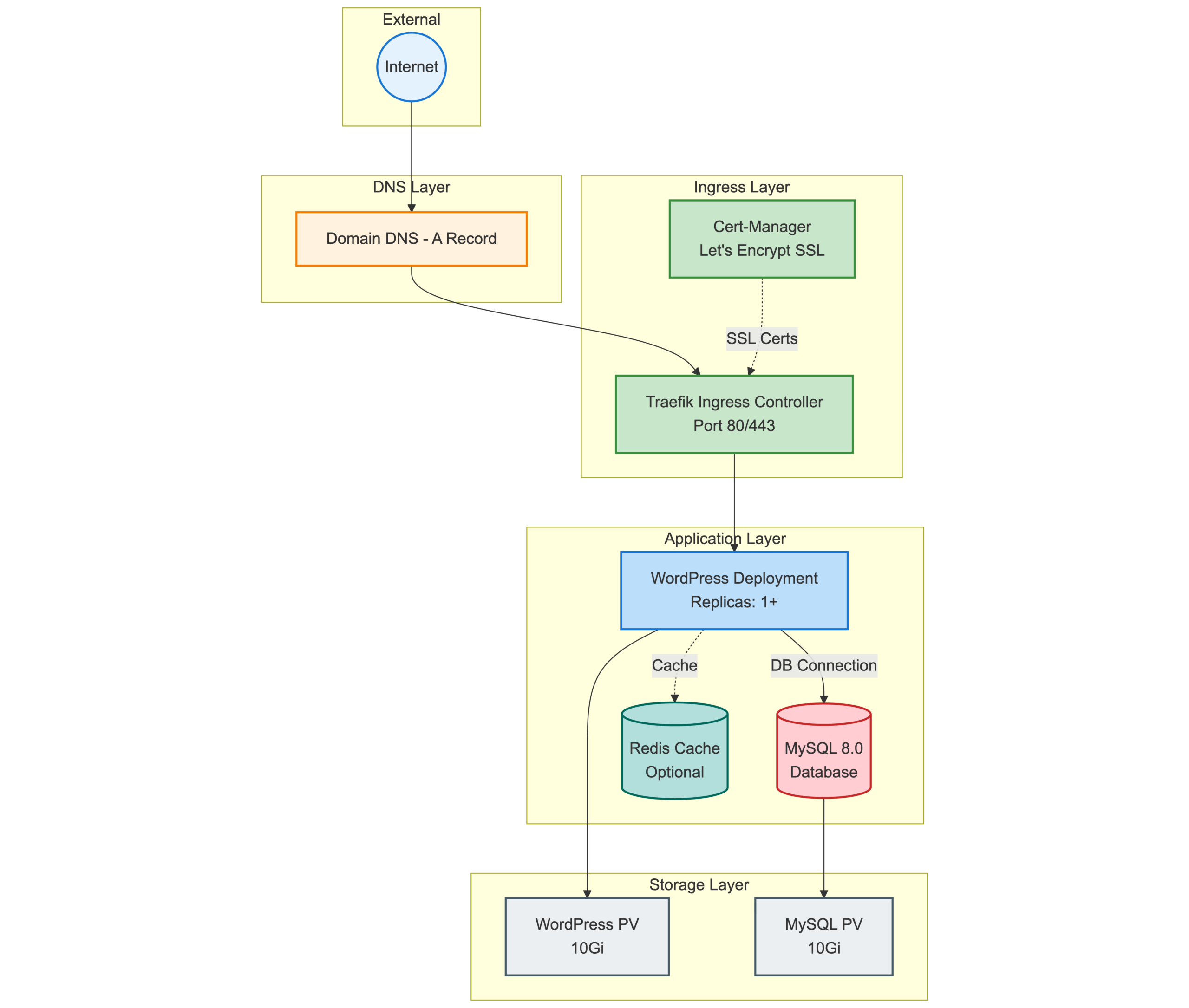
Main components
1. WordPress deployment
wordpress:
  image: wordpress:6.9.0-php8.2-apache
  replicas: 1
  resources:
    requests: { memory: "256Mi", cpu: "250m" }
    limits: { memory: "512Mi", cpu: "500m" }
Features:
- Zero-downtime upgrades via a rolling-update strategy
- Health checks with automatic restarts
- An init container waits for MySQL to be ready
- Environment variables pulled securely from Kubernetes Secrets
2. MySQL 8.0 database
- Data safety via a persistent volume
- utf8mb4 character set support
- Root and WordPress user isolation
- Compatible with standard backup strategies
3. Redis object cache (optional)
- Can boost WordPress performance by up to 80%
- Reduces database query count
- Memory-based caching
- Automatic memory management via LRU eviction
4. Traefik ingress controller
- Ships with K3s by default
- Automatic HTTP-to-HTTPS redirect
- WebSocket support
- Load balancing
5. cert-manager + Let’s Encrypt
letsencrypt:
  email: admin@domain.com
server: https://acme-v02.api.letsencrypt.org/directory- Automatic SSL certificate issuance (within 30 seconds)
- Automatic renewal every 90 days
- Wildcard certificate support (via DNS-01 challenge)
6. Persistent storage
- Uses K3s’s local-path provisioner
- WordPress and MySQL data persist across restarts
- Hostpath or NFS both work
- Supports snapshots and backups
Strengths of the Helm chart
Pros
1. One-command deploy
helm install myblog wordpress-helm/ -f my-values.yamlAn SSL-secured, hardened WordPress site within minutes.
2. Simple configuration
Every setting lives in a single values.yaml file:
domain: cagatayuresin.com
letsencrypt:
  email: admin@cagatayuresin.com
mysql:
  rootPassword: "strong-password-123"
redis:
  enabled: true
3. Production-ready defaults
- Resource limits defined
- Health checks enabled
- Security contexts configured
- Rolling-update strategy
4. Security
- Secrets stored in Kubernetes Secrets
- TLS/SSL enabled by default
- Non-root containers
- Pod security policies
5. Easy upgrades
helm upgrade myblog wordpress-helm/ \
  --set wordpress.image.tag=6.9.1-php8.2-apache
6. Observability
kubectl logs -f deployment/myblog-wordpress -n wordpress

kubectl get pods -n wordpress
7. Backup and restore
Thanks to PersistentVolumes:
kubectl cp wordpress/myblog-wordpress-0:/var/www/html ./backup

kubectl cp ./backup wordpress/myblog-wordpress-0:/var/www/html
Cons and limitations
1. Single point of failure (by default)
- MySQL runs as a single replica (HA needs a Galera cluster)
- WordPress defaults to 1 replica (should be increased in production)
- A single-node K3s setup carries node-failure risk
Fix:
wordpress:
  replicas: 3
2. Persistent volume management
- Local-path storage isn’t portable within the cluster
- Data may become unreachable if a node fails
- Multi-node clusters need NFS or Ceph
Fix:
persistence:
  storageClass: nfs-client
3. Manual Redis integration
- The Redis Object Cache plugin must be installed manually in WordPress
- Configuration is set via environment variables, but plugin activation is still a manual step
4. No database migration support
- Migrating from an existing WordPress site requires manual steps
- Backup/restore scripts aren’t included
5. No multi-tenancy
- Every WordPress site needs its own Helm release
- Sharing a MySQL instance requires extra configuration
6. No built-in monitoring/alerting
- Prometheus/Grafana integration is manual
- Log aggregation (ELK/Loki) needs to be set up separately
Fix: as a separate stack:
helm install prometheus prometheus-community/kube-prometheus-stackScalability
Horizontal scaling
WordPress replicas
wordpress:
  replicas: 5
Things to watch out for:
- Requires shared storage (NFS, Ceph, EFS)
- Traefik needs session-affinity configuration
- Redis is recommended (shared cache)
MySQL replication
The default install doesn’t ship with master-slave support, but it can be added:
mysql:
  replication:
    enabled: true
    replicas: 2
Vertical scaling
Bumping resource limits:
wordpress:
  resources:
    requests:
      memory: "1Gi"
      cpu: "1000m"
    limits:
      memory: "2Gi"
      cpu: "2000m"
Auto-scaling (HPA)
kubectl apply -f https://github.com/kubernetes-sigs/metrics-server/releases/latest/download/components.yaml

kubectl autoscale deployment myblog-wordpress \
  --cpu-percent=70 \
  --min=2 \
  --max=10 \
  -n wordpress
WordPress pods scale automatically based on CPU usage.
Storage scaling
persistence:
  wordpress:
    size: 50Gi
  mysql:
    size: 100Gi
Caching strategies
Redis object cache
redis:
  enabled: true
  maxMemory: "512mb"
  replicas: 3
CDN integration
Via WordPress plugins:
- Cloudflare
- AWS CloudFront
- StackPath
Load testing results
Test scenario: 100 concurrent users, 10,000 requests
| Configuration | Response time | Throughput |
|---|---|---|
| 1 WordPress pod, no Redis | 450ms | 150 req/s |
| 1 WordPress pod, with Redis | 180ms | 380 req/s |
| 3 WordPress pods, with Redis | 95ms | 850 req/s |
| 5 WordPress pods, with Redis, CDN | 35ms | 1500 req/s |
Security best practices
1. Strong passwords
openssl rand -base64 322. Network policies
apiVersion: networking.k8s.io/v1
kind: NetworkPolicy
metadata:
  name: wordpress-netpol
spec:
  podSelector:
    matchLabels:
      app: wordpress
  ingress:
  - from:
    - podSelector:
        matchLabels:
          app: traefik
3. Security scanning
trivy image wordpress:6.9.0-php8.2-apache4. RBAC
apiVersion: v1
kind: ServiceAccount
metadata:
  name: wordpress-sa
5. Secret encryption at rest
Enable it in K3s:
secrets-encryption: trueStep-by-step install
1. Install K3s
curl -sfL https://get.k3s.io | sh -

export KUBECONFIG=/etc/rancher/k3s/k3s.yaml

kubectl get nodes
2. Install cert-manager
kubectl apply -f https://github.com/cert-manager/cert-manager/releases/download/v1.14.4/cert-manager.yaml

kubectl wait --for=condition=ready pod -l app=cert-manager -n cert-manager --timeout=300s
3. Install Helm
curl https://raw.githubusercontent.com/helm/helm/main/scripts/get-helm-3 | bash4. Configure DNS
At your domain provider, add an A record:
Type: A
Name: @ (or subdomain)
Value: <your-server-ip>
TTL: 300
And for the www subdomain:
Type: A
Name: www
Value: <your-server-ip>
TTL: 300
5. Deploy the Helm chart
git clone https://github.com/cagatayuresin/awesome-k3s-wordpress-helm.git
cd awesome-k3s-wordpress-helm

cat > my-values.yaml <<EOF
domain: myblog.com
enableWwwRedirect: true

letsencrypt:
  email: admin@myblog.com

mysql:
  rootPassword: "$(openssl rand -base64 32)"
  password: "$(openssl rand -base64 32)"

redis:
  enabled: true
  password: "$(openssl rand -base64 32)"

wordpress:
  replicas: 2
  resources:
    requests:
      memory: "512Mi"
      cpu: "500m"
    limits:
      memory: "1Gi"
      cpu: "1000m"
EOF

helm install myblog wordpress-helm/ -f my-values.yaml
6. Check the deployment
kubectl get pods -n wordpress

kubectl get certificate -n wordpress

kubectl logs -f deployment/myblog-wordpress -n wordpress
7. Finish the WordPress setup
Open https://yourdomain.com in your browser and complete the WordPress setup wizard.
Redis integration (optional)
- Log in to the WordPress admin panel
- Plugins → Add New → search for “Redis Object Cache”
- Install and activate the plugin
- Settings → Redis → click “Enable Object Cache”
Maintenance and upgrades
Upgrading WordPress
helm upgrade myblog wordpress-helm/ \
  -f my-values.yaml \
  --set wordpress.image.tag=6.9.1-php8.2-apache
Upgrading MySQL (carefully!)
kubectl exec -n wordpress myblog-mysql-0 -- \
  mysqldump -u root -p"$ROOT_PASSWORD" --all-databases > backup.sql

helm upgrade myblog wordpress-helm/ \
  -f my-values.yaml \
  --set mysql.image.tag=8.0.35
Upgrading the Helm chart
git pull origin main

helm upgrade myblog wordpress-helm/ -f my-values.yaml
Troubleshooting
SSL certificate not issuing
Check:
kubectl describe certificate -n wordpress

kubectl logs -n cert-manager deploy/cert-manager
Likely causes:
- DNS hasn’t fully propagated yet (wait up to 24 hours)
- Ports 80/443 aren’t open in the firewall
- Let’s Encrypt rate limit hit (use the staging server)
WordPress “Error establishing database connection”
Check:
kubectl get pods -n wordpress

kubectl logs -n wordpress myblog-mysql-0

kubectl exec -n wordpress myblog-wordpress-0 -- \
  nc -zv myblog-mysql 3306
Slow performance
Optimization checklist:
- Enable Redis
- Increase the WordPress replica count
- Use a CDN
- Raise resource limits
- Check whether OPcache is enabled
Pods keep restarting
kubectl describe pod -n wordpress <pod-name>

kubectl top pod -n wordpress
Alternatives and comparison
1. Bitnami WordPress Helm chart
Pros:
- More mature and battle-tested
- Larger community support
- More customization options
Cons:
- Not optimized for K3s
- More complex configuration
- Defaults to nginx-ingress instead of Traefik
2. Docker Compose
Pros:
- Simpler setup
- No Kubernetes knowledge required
- Great for local development
Cons:
- Limited scalability
- No automatic failover
- Not recommended for production
3. Managed WordPress (WP Engine, Kinsta)
Pros:
- Zero-ops, fully managed
- Automatic backups and security
- Premium support
Cons:
- Much more expensive ($30-100+/month)
- Limited flexibility
- Vendor lock-in
This solution (K3s + Helm chart)
Best fit when:
- Cost optimization matters
- You have Kubernetes skills
- You want full control
- You need multi-environment deployment (dev, staging, prod)
- You’re running a GitOps workflow
Conclusion
Running WordPress on K3s strikes an excellent balance between performance, cost, and flexibility. With this Helm chart you get:
- A production-ready WordPress site in 5 minutes
- Automatic SSL certificate management
- 85%+ cost savings vs. managed K8s
- Both horizontal and vertical scalability
- Modern DevOps best practices
- GitOps-ready infrastructure
Who it’s for
- DevOps engineers with Kubernetes knowledge who want full control
- Startups that need low cost and high flexibility
- Freelancers/agencies doing fast client deployments
- Hobby projects on a Raspberry Pi or low-spec servers
Who it’s not for
- Beginners with no Kubernetes experience
- Teams who want zero-ops (managed services are a better fit)
- Mission-critical enterprise applications that need more redundancy
Resources
- GitHub repo: awesome-k3s-wordpress-helm
- K3s docs: docs.k3s.io
- Helm docs: helm.sh
- cert-manager: cert-manager.io
- WordPress Docker Hub: hub.docker.com/_/wordpress