 cagatayuresin
n8n Academic Job Tracker: Automating ilan.gov.tr

The n8n academic job tracker scans ilan.gov.tr hourly for Research Assistant, Faculty Member, and Specialist postings, sending notifications over Telegram and email. Over the last two years n8n has rapidly stood out in the workflow-automation space — mainly because it can run self-hosted, takes data privacy seriously, and lets you drop into JavaScript directly when you need to. This post walks through setting up and using this open-source workflow step by step.
For the n8n Helm setup, see my awesome-k3s-n8n-helm repo.
Who is this for?
This workflow is directly useful to four different kinds of users. Researchers advancing their academic careers who want to track postings in real time get the most value out of it. Advisors and administrators tracking postings on behalf of multiple candidates are also a target group. It’s a solid starting point for developers learning n8n who need a real-world use case. And anyone running self-hosted n8n on their own server can adopt this workflow with minimal configuration.
Why has n8n become so popular?
Compared to cloud-based competitors like Zapier and Make, n8n offers a few critical advantages. First and foremost, it’s self-hosted, so your data stays entirely on your own infrastructure. The Code node lets you write JavaScript, giving you full flexibility in scenarios where the standard nodes fall short. On top of that, the Community edition is free and open source, so there’s no API quota or monthly fee. For all these reasons, n8n has become a favorite among technical users and anyone who cares about data privacy.
How the workflow works
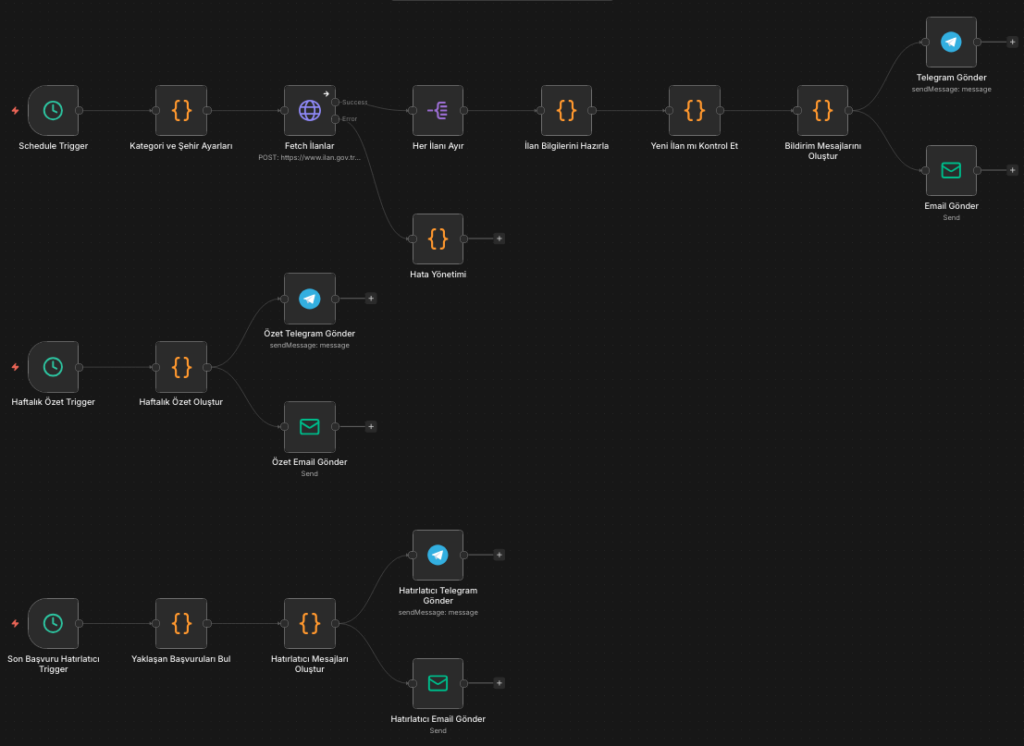
The workflow consists of 18 nodes across 3 independent flows in total, all shipped as a single workflow.json file. After importing it, you can run the whole system without writing any code beyond entering your credentials.
Flow 1 — Hourly automated scan
The core flow runs every hour and follows these steps:
- Category and city settings — A single
CONFIGobject defines which categories and cities to track, so all your settings live in one place. - API request — A separate
POSTrequest is sent to ilan.gov.tr’s open data endpoint for each category, pulling up to 50 postings per page. - Deduplication — n8n’s Workflow Static Data mechanism acts as memory: the same posting is never reported twice, and no external database is needed.
- Notification — When a new posting is detected, an HTML-formatted Telegram message and a gradient-styled email are sent simultaneously.
Flow 2 — Weekly summary (every Monday at 09:00)
Every Monday morning, the postings accumulated in Static Data are automatically summarized. A statistics table broken down by city and institution is sent to both Telegram and as an HTML email, giving you a one-glance view of the week’s academic job traffic.
Flow 3 — Application deadline reminder (daily at 08:00)
Every morning the system scans for postings with 2 days or less left until the application deadline. It sends an alert for any posting that hasn’t already been flagged, and does so only once per posting — so there’s no repeated notification noise.
Features at a glance
| Feature | Detail |
|---|---|
| ⏱️ Check frequency | Hourly (configurable) |
| 📢 Notification channels | Telegram + Email (simultaneous) |
| 🏷️ Category support | Multiple — 693, 672, 73, and others |
| 📍 City filter | By province code; empty = all of Turkey |
| 🔍 Keyword | Search in title and institution name |
| 📊 Weekly summary | Monday 09:00, city/institution stats |
| ⏰ Reminder | 2 days before deadline, single notification |
| 🧠 Memory | Static Data — no external DB required |
| 🛡️ Error handling | Workflow keeps running on API errors |
| 🗃️ Posting capacity | 500 records, automatic cleanup |
Category ID reference table
The ilan.gov.tr API uses separate category codes for different academic positions. Pick the one you need from the table below — and you can combine more than one at once.
| Code | Category | Description |
|---|---|---|
693 | Research/Teaching Assistant / Specialist | The busiest category, default choice |
672 | Faculty positions | Professor, Associate Professor, Assistant Professor |
73 | All academic staff | Covers every category in a single query |
Setup (5 steps)
The setup process takes five steps. If you’re already running self-hosted n8n on Docker or K3s, this takes under 5 minutes.
Step 1 — Import the workflow
In the n8n editor, choose ⋯ → Import from URL and paste:
https://raw.githubusercontent.com/cagatayuresin/n8n-ilan-gov-tr-akademik-is-ilani-takip/main/workflow.jsonStep 2 — Add a Telegram credential
Create a bot via BotFather and grab the token. Then go to Settings → Credentials → New → Telegram API, paste the token, and set your target chat ID in the Send Telegram node.
You can get your chat ID in minutes via @userinfobot.
Step 3 — Add an SMTP credential
Open Settings → Credentials → New → SMTP. Enter the host, port, and login details. Gmail users need an App Password. Then update the sender and recipient addresses in the Send Email nodes.
Step 4 — Configure categories and cities
Open the “Category and City Settings” node and edit the CONFIG object:
const CONFIG = {
  categories: [693, 672],   // Research Assistant + Faculty
  cities: [6, 34, 35],      // Ankara, Istanbul, Izmir — empty [] = all of Turkey
  keywords: ["Computer"],   // empty [] = no filter
  maxResults: 50
};
Step 5 — Activate
Switch the workflow to Active. The first run kicks off at the next full hour; after that it keeps running on schedule.
What the notifications look like
New posting alert
🎓 NEW ACADEMIC POSTING

📋 Posting No: YOK850001
🏛️ Institution: EXAMPLE UNIVERSITY RECTORATE
📌 Title: Research Assistant Position
📍 City: ANKARA
📅 Publish Date: 01.04.2026

🔗 View Posting
Deadline reminder
⏳ APPLICATION DEADLINE REMINDER

Less than 2 days left to apply!

📋 YOK850001 — EXAMPLE UNIVERSITY
⏰ Deadline: 03.04.2026

🔗 View Posting
Where to find the source
You can find the full source, setup docs, and the GitHub Actions validation pipeline in the repo below. Worth noting: the project is MIT-licensed and doesn’t depend on any paid service.
🔗 github.com/cagatayuresin/n8n-ilan-gov-tr-akademik-is-ilani-takip
Feature requests and contributions are welcome via GitHub Issues and Pull Requests — new integrations like Discord webhook support are being developed with community input.
Conclusion
In short, the n8n academic job tracker workflow completely removes the need to manually check ilan.gov.tr. Setup takes under 5 minutes, it requires no maintenance, and it runs on your own infrastructure. The result: you save time and the risk of missing a posting drops to zero. For questions, use the comments or GitHub Issues.
This project has no official affiliation with ilan.gov.tr; it uses their public open data API.