 cagatayuresin
T3 Gemstone O1: Open Source Edge AI Development Board
T3 Gemstone O1 is an open-source edge AI development board built around the Texas Instruments AM67A vision SoC. It combines a Linux-capable quad-core Arm platform, real-time Cortex-R5F cores, dedicated AI acceleration, rich camera and display interfaces, onboard eMMC storage, and an ecosystem of open hardware files, operating system images, SDK tooling, and example projects.
That makes T3 Gemstone more than another single-board computer for hobby experiments. The interesting part is the full stack around the board: official documentation, the t3gemstone GitHub organization, Gem Imager for flashing SD card or eMMC images, a Debian/Ubuntu/Pardus-capable SDK path, Preempt-RT Linux for time-sensitive workloads, and project guides for robotics, autonomous vehicles, edge AI, IoT, and industrial automation.
If you are evaluating an open-source hardware board for computer vision, robotics, machine learning at the edge, or embedded Linux development, T3-GEM-O1 is worth studying because it sits at a useful intersection: accessible enough for students and makers, but structured like a platform that serious embedded engineers can inspect, rebuild, and extend.
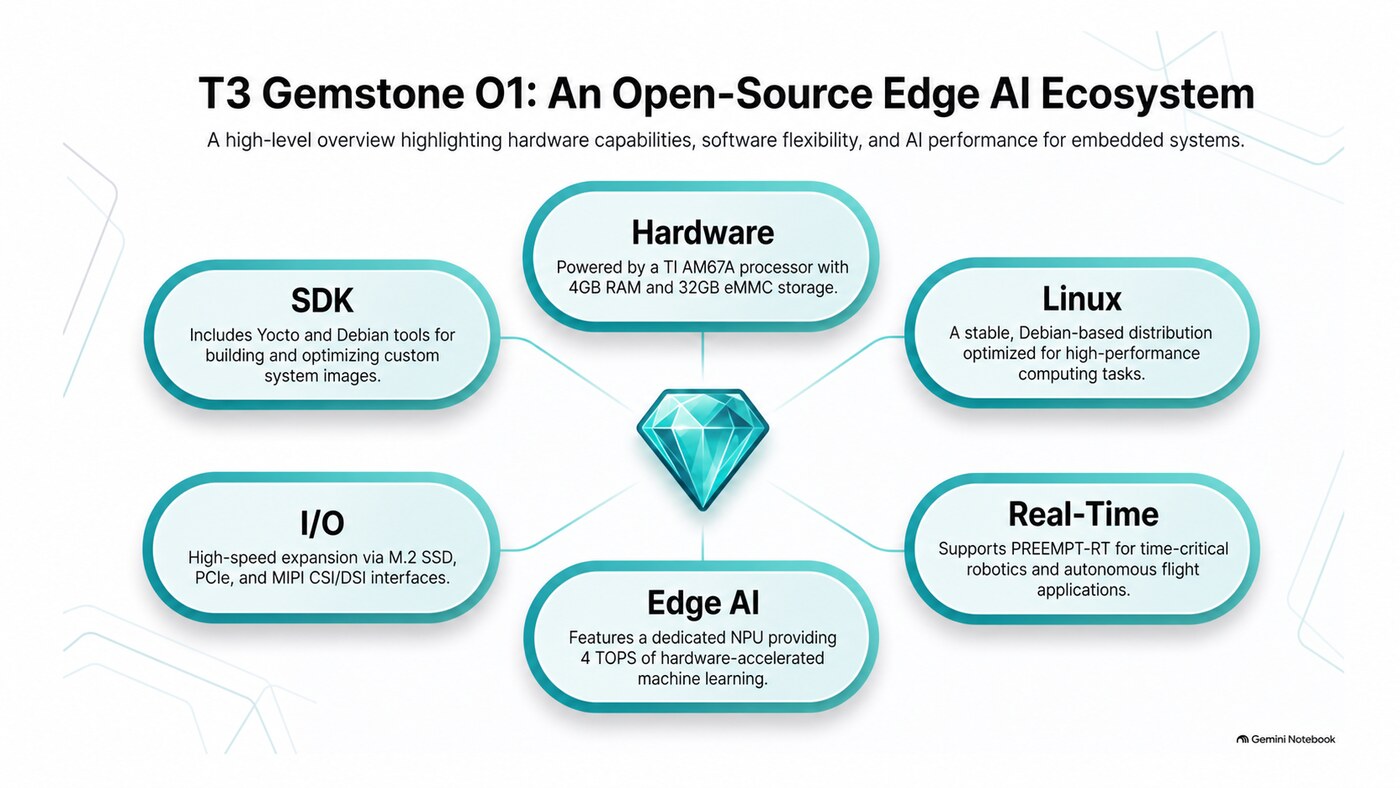
What T3 Gemstone Is
T3 Gemstone is a family of development boards created by the Turkish Technology Team Foundation, commonly known as T3 Foundation. The public messaging describes it as “the new gem of the open source world”, but the more useful engineering description is this: Gemstone is an open hardware and open software ecosystem for building AI-assisted embedded systems.
The first board in the family is T3-GEM-O1. The official site positions it as a high-performance, cost-effective development board for anything from small hobby projects to larger professional solutions. The documentation describes Gemstone boards as open-source software and hardware platforms with AI-supported hardware and an optimized real-time Debian-based GNU/Linux operating system for areas such as TEKNOFEST competitions, manned and unmanned systems, IoT, robotics, and similar applications.
The important phrase there is ecosystem. A useful development board is not only the PCB. It is the boot path, the operating system image, the toolchain, the documentation, the example code, the package repository, the community, and the license model. T3 Gemstone is interesting because it is trying to make those layers visible rather than hiding them behind a black-box product page.
The official docs are already broad: board specifications, quick start, development workflow, operating system variants, image writer, eMMC flashing, SDK internals, Yocto, Debos, U-Boot, kernel work, Edge AI guides, project examples, roadmap, FAQ, and troubleshooting. That is a strong signal for developers who do not just want to run demos, but also want to understand how the system is assembled.
Why It Matters
Most embedded AI projects start with a practical mismatch. A cheap microcontroller may be excellent for GPIO, PWM, and deterministic control, but weak for Linux, computer vision, AI inference, and rich networking. A general-purpose single-board computer may run Linux comfortably, but it may not expose the real-time control, industrial I/O, or accelerator path that robotics and edge AI projects eventually need.
T3-GEM-O1 tries to bridge that gap. The AM67A foundation gives the board a heterogeneous architecture:
- Arm Cortex-A53 cores for Linux and high-level applications
- Cortex-R5F cores for real-time MCU workloads
- C7x DSP and matrix acceleration paths for vision and AI workloads
- GPU support for graphics and multimedia
- camera, display, network, storage, sensor, and expansion interfaces for real projects
That combination matters for robotics and industrial workloads because those systems are rarely “just AI” or “just control.” A robot may need camera input, object detection, path planning, motor control, telemetry, a web dashboard, a local database, and safe fallback behavior. A smart camera may need local inference, display output, hardware-accelerated image processing, remote updates, and reliable storage. A vehicle platform may need Linux for high-level mission logic while keeping low-latency control isolated.
In other words, the value of T3 Gemstone is not only its 4 TOPS AI headline. The value is the way the board gives developers a place to connect Linux applications, real-time firmware, edge AI models, physical interfaces, and open-source build tooling.
T3-GEM-O1 Hardware Overview
The official board specification and hardware repository describe T3-GEM-O1 as a high-performance 64-bit single-board computer based on the Texas Instruments AM67A processor. The board is designed for AI, vision, and embedded edge applications.
Here are the headline specifications from the public material:
| Area | T3-GEM-O1 capability |
|---|---|
| SoC | Texas Instruments AM67A vision SoC |
| CPU | Quad-core 64-bit Arm Cortex-A53 at 1.4 GHz |
| Real-time cores | Dual Arm Cortex-R5F cores at 800 MHz |
| AI acceleration | Dual 2 TOPS deep learning accelerators, 4 TOPS total |
| GPU | 50 GFLOPS graphics path with OpenGL ES, OpenCL, and Vulkan support |
| Memory | 4 GB LPDDR4 RAM |
| Onboard storage | 32 GB eMMC plus configuration EEPROM |
| Expandable storage | microSD and M.2 2280 SSD support |
| Camera and display | MIPI CSI/DSI, HDMI, and display cable ecosystem |
| Connectivity | Gigabit Ethernet, Wi-Fi 802.11n, Bluetooth 5.1 BLE, CAN |
| Expansion | 40-pin GPIO header, UART, I2C, SPI, PWM, JTAG |
| Sensors | 9-axis IMU, barometer, humidity and temperature sensing |
| Power | USB Type-C and DC power input options |
Several details are especially useful in practice.
First, onboard 32 GB eMMC reduces the usual microSD reliability problem. SD cards are convenient for prototyping, but they are not the best default storage for devices that boot often, log data, or operate in the field. eMMC gives the operating system and application data a more stable place to live, while microSD remains useful for flashing, testing, and recovery.
Second, the M.2 SSD path makes the board more realistic for data-heavy edge workloads. Vision systems, telemetry collection, local AI datasets, and media pipelines can outgrow SD cards quickly. Local NVMe storage is not glamorous, but it can be the difference between a demo and a device you can actually leave running.
Third, the board is not limited to one kind of project. MIPI CSI matters for camera pipelines. DSI and HDMI matter for HMIs, dashboards, kiosks, and control panels. CAN matters for vehicle and industrial environments. GPIO, UART, I2C, SPI, PWM, and JTAG matter when the work becomes physical.
The AM67A Angle
The Texas Instruments AM67A product page describes the chip as an Arm Cortex-A53 4 TOPS vision SoC for cameras, machine vision, robotics, and smart HMI systems. That lines up well with the T3 Gemstone positioning.
The most important architectural idea is heterogeneity. Instead of treating the CPU as the only compute unit, AM67A-based systems can split work across different engines:
- Linux services, Python applications, ROS 2 nodes, OpenCV tools, and dashboards can run on the Cortex-A53 side.
- Time-sensitive or safety-adjacent routines can move to Cortex-R5F cores.
- Image processing and model inference can use the C7x DSP and Matrix Multiply Accelerator path.
- Graphics and HMI rendering can use the GPU path.
This is the kind of split embedded engineers usually want, but it does increase software complexity. You need documentation, examples, build tooling, and a community that can explain which part of the chip should do which part of the work. That is why the Gemstone documentation spends time on the microprocessor, Edge AI, MCU examples, NuttX, PX4, ArduPilot, and SDK internals instead of stopping at a one-page spec sheet.
Edge AI on the Device
Edge AI means processing data where it is collected instead of sending everything to the cloud. For camera systems, drones, industrial sensors, vehicles, and robotics platforms, this has three obvious benefits:
- lower latency because decisions are made locally
- better privacy because raw data does not need to leave the device
- lower network dependency because the device can keep working when connectivity is weak
The Gemstone Edge AI documentation explains this in the context of AM67A, MMA acceleration, and C7x DSP processing. It also gives rough workload examples: object detection, face recognition, anomaly detection from vibration data, license plate recognition, voice commands, and OCR.
This is exactly where a board like T3-GEM-O1 becomes interesting. You can prototype a vision model, connect a camera through CSI, display results through HDMI or DSI, store logs locally, expose telemetry over Ethernet or Wi-Fi, and later move parts of the system closer to real-time control.
For a practical project, I would think about the edge AI pipeline like this:
Camera or sensor input
  -> preprocessing and buffering
  -> accelerated model inference
  -> application-level decision
  -> actuator, UI, telemetry, or alert output
  -> local logging and remote update path
That is a much more useful framing than asking only how many TOPS the board has. TOPS matters, but the system design matters more. A good edge AI device needs deterministic I/O, a stable image, thermal planning, storage discipline, model deployment tooling, and a recovery path.
Real-Time Linux and Control Workloads
The T3 Gemstone docs put meaningful emphasis on real-time behavior. The Preempt-RT project guide explains the trade-off clearly: normal Linux optimizes throughput and fairness, while real-time workloads need predictable latency. Preempt-RT makes much of the Linux kernel preemptible so higher-priority work can interrupt lower-priority kernel activity.
Gemstone’s Minimal image uses a Preempt-RT Linux kernel by default. That makes it a better starting point for robotics, IoT, autopilot-adjacent tasks, and timing-sensitive embedded workloads than a heavier desktop image.
This does not mean every hard real-time problem belongs on Linux. In a heterogeneous system, the clean design is often to put high-level orchestration on Linux and put the tightest control loops on the real-time cores or an RTOS path. The Gemstone roadmap and documentation point in that direction with work around NuttX, PX4, ChibiOS, ArduPilot, and R5 core usage.
The practical lesson is simple: choose the execution environment based on the task.
| Workload | Better starting point |
|---|---|
| Web UI, REST API, telemetry, storage | Linux on Cortex-A53 |
| ROS 2, OpenCV, Python prototyping | Linux on Cortex-A53 |
| Low-latency periodic task | Preempt-RT Minimal image |
| Flight-control-style timing | R5F or RTOS-oriented path |
| Vision model inference | C7x/MMA acceleration path |
| HMI or kiosk display | Kiosk/Desktop image with DSI or HDMI |
That layered view is what makes the board more serious than a simple “Linux computer with pins” description.
Software Images: Minimal, Kiosk, and Desktop
T3 Gemstone provides operating system images for different project shapes. The operating system docs describe three main image types:
- Desktop: a full graphical environment for prototyping, learning, testing, and using the board as a small computer.
- Kiosk: a graphics-capable image without the full desktop environment, useful for touch panels, dashboards, command panels, and embedded HMI systems.
- Minimal: a lightweight image with real-time Linux focus, better suited for IoT, robotics, autopilot, and embedded software development.
That split is good engineering. A classroom workshop and an autonomous robot should not have the same default image. A kiosk panel needs graphics but not necessarily a full desktop. A field device needs fewer moving parts, faster boot, more predictable behavior, and easier remote management.
For most users, the recommended path is to start with Desktop if you are learning the board, then move to Minimal or Kiosk once the project shape is clear.
Gem Imager: Flashing SD Card or eMMC
The easiest way to start is T3 Gemstone Imager. The official software page says Gem Imager can write images to an SD card or directly to the eMMC on the board, and it provides builds for Windows, macOS, and Linux.
The quick start flow is roughly:
- Download Gem Imager for your operating system.
- Choose the T3-GEM-O1 board.
- Select the operating system image: Desktop, Kiosk, or Minimal.
- Choose the target storage: SD card or eMMC where supported.
- Configure password, Wi-Fi, locale, and services such as SSH if needed.
- Write the image.
- Set the boot mode and start the board.
- Connect through display, serial, Ethernet, USB gadget networking, SSH, or VNC depending on the image and configuration.
This matters because embedded board setup is often where people lose the most time. A good imager hides the dangerous parts without preventing advanced users from going deeper later.
For a lab or team workflow, I would standardize on two images:
- a Desktop image for exploration, teaching, debugging, and early testing
- a Minimal image for automated projects, headless operation, robotics, and performance-sensitive work
That keeps experimentation comfortable while leaving a clean path toward deployment.
Development Workflow
The Gemstone development guide describes two primary ways to build software:
- compile directly on the board
- cross-compile on a developer workstation and copy the result to the board
Direct development is simple and useful while learning:
git clone https://github.com/t3gemstone/examples.git
cd examples
sudo apt install -y build-essential libncurses-dev libgpiod-dev
./setup.sh
devbox shell
task fetch
CROSS_COMPILE=false PROJECT=magnetometer task build
sudo ./build/examples/magnetometer/c/magnetometer
Cross-compilation is better when builds become larger:
git clone https://github.com/t3gemstone/examples.git
cd examples
./setup.sh
devbox shell
task fetch
PROJECT=serial task clean build
scp -r build/examples gemstone@10.0.0.1:build
The examples repository is a good first stop because it covers real hardware usage rather than abstract hello-world samples. At the time of writing, the repository includes example areas such as AI, camera, CAN bus, GPIO, GUI, IMU, MCU, Preempt-RT, PWM, Python notebook, and serial.
That is the right kind of sample set for a board like this. It helps developers answer concrete questions:
- How do I read the IMU?
- How do I talk over CAN?
- How do I test a real-time task?
- How do I compile C, C++, or Python examples?
- How do I use the R5F and C7x paths?
- How do I move from on-board development to cross-compilation?
The SDK Path for Serious Customization
Most users should not start with the SDK. If your goal is to build a robot, camera system, smart home controller, or demo project, start with Gem Imager and the examples repository.
The SDK becomes important when you want to understand or rebuild the operating system itself. The t3gemstone/sdk repository describes itself as the work needed to compile the operating system, kernel, and other tools found on T3 Gemstone boards. The SDK docs explain the build path with Docker, Devbox, Distrobox, Yocto, Debos, U-Boot, kernel components, and image generation.
The basic SDK flow looks like this:
git clone https://github.com/t3gemstone/sdk.git
cd sdk
./setup.sh
devbox shell
task fetch
task permissions
task box
Inside the Distrobox environment, the SDK can build Yocto components and then assemble distribution images:
task yocto:build MACHINE=t3-gem-o1
task distro:build MACHINE=t3-gem-o1 DISTRO_TYPE=minimal DISTRO_BASE=ubuntu DISTRO_SUITE=jammy IMG_SIZE=16G
Expect this path to take time and disk space. It is an embedded Linux build workflow, not a fast package install. But it is also the difference between “I can use this board” and “I can reproduce how this board boots.”
For open-source hardware, that distinction matters. Hardware files are only half of openness. A rebuildable software stack is what turns a board into a platform.
ArduPilot, NuttX, PX4, and Robotics
T3 Gemstone’s robotics story is one of the most interesting parts of the ecosystem. The official docs include project guides for ArduPilot, NuttX, PX4, VTOL, and TEKNOFEST-style vehicle projects.
The independent ArduPilot T3 Gemstone O1 overview describes T3 Gemstone O1 as a high-performance development board based on TI AM67A that runs the ArduPilot flight stack on Linux. The Gemstone ArduPilot guide explains installation through the T3 Gemstone APT repository and systemd services for vehicle types such as copter, plane, rover, and sub.
This gives developers a realistic path:
- use Linux for ArduPilot packaging, services, logging, networking, and tooling
- enable the required device-tree overlays
- configure serial ports, GPS, SBUS, PWM, and telemetry paths
- tune CPU isolation for better latency characteristics where appropriate
- follow the roadmap toward deeper R5/RTOS integration for stricter timing domains
That does not make the board a drop-in replacement for every flight controller. Autopilot systems are safety-critical and require careful validation. But as an open development platform for autonomous systems, T3-GEM-O1 gives students, researchers, and robotics teams a rich surface to learn from.
Practical Project Ideas
The official site mentions smart home systems, personal media servers, retro game consoles, security cameras, and industrial use cases. The raw idea is broad, so here is a more engineer-focused project map.
| Project | Why T3-GEM-O1 fits |
|---|---|
| Smart camera with local object detection | CSI camera, edge AI acceleration, local storage, network output |
| Robot perception module | camera input, IMU, Linux, OpenCV, AI inference, GPIO/CAN integration |
| Industrial dashboard or HMI | DSI/HDMI display, Kiosk image, Ethernet, local services |
| Autonomous vehicle companion computer | Linux services, telemetry, storage, ArduPilot ecosystem |
| Factory anomaly detector | sensor input, local inference, low-latency alerting, rugged I/O needs |
| Smart home controller | Linux services, Wi-Fi/Ethernet, display option, automation scripts |
| Embedded AI learning lab | open hardware files, docs, examples, SDK, visible build chain |
| Edge media or data appliance | eMMC, NVMe option, network, low-power local processing |
The strongest fit is not “one board for everything.” The strongest fit is projects that benefit from multiple layers at once: Linux plus physical I/O, AI plus cameras, display plus control, local storage plus network, high-level software plus real-time paths.
How It Compares Conceptually
T3-GEM-O1 will naturally be compared with well-known single-board computers. That comparison is useful, but only if you compare by workload rather than brand familiarity.
If your project is a simple web kiosk, file server, or beginner Linux toy, almost any popular SBC may be enough. If your project depends on camera pipelines, AI inference, robotics sensors, real-time experimentation, CAN, GPIO, device-tree overlays, custom images, and open hardware inspection, T3 Gemstone becomes much more compelling.
The board is closer to an embedded edge AI platform than a pure general-purpose mini computer. That means the learning curve is also higher. Developers should expect to read documentation, understand the image variants, learn the examples, and pay attention to power, thermals, boot mode, kernel overlays, and interface configuration.
That is not a weakness. It is the cost of building systems that interact with the physical world.
T3 Gemstone O1 vs Market Alternatives
For a practical buying or prototyping decision, the closest comparisons are not only generic Raspberry Pi-style SBCs. T3-GEM-O1 overlaps with edge AI and embedded Linux boards such as NVIDIA Jetson Orin Nano Super Developer Kit, Orange Pi 5 Plus, Raspberry Pi 5 with an AI accelerator add-on, and BeagleY-AI.
The important thing is to compare system shape, not just TOPS. Jetson wins easily on raw AI acceleration. Raspberry Pi wins on ecosystem familiarity. Orange Pi gives strong general-purpose compute and rich I/O at an aggressive price point. BeagleY-AI is the closest architectural cousin because it also uses TI AM67A. T3-GEM-O1’s angle is different: it combines AM67A, onboard eMMC, M.2 expansion, real-time R5F cores, sensors, Gem Imager, SDK tooling, and a documentation path that is intentionally built around open hardware, robotics, and education.
| Board | AI acceleration | Memory and storage | Real-time/control story | Best fit | Where T3-GEM-O1 differs |
|---|---|---|---|---|---|
| T3-GEM-O1 | 4 TOPS through AM67A C7x/MMA acceleration | 4 GB LPDDR4, 32 GB onboard eMMC, microSD, M.2 2280 NVMe | Dual Cortex-R5F cores, Preempt-RT image, robotics/autopilot documentation | Open edge AI, robotics, embedded Linux education, inspectable platform work | Integrated eMMC, sensors, open hardware files, Gem Imager, SDK, and T3-specific docs are part of the core platform |
| NVIDIA Jetson Orin Nano Super Developer Kit | Up to 67 INT8 TOPS | 8 GB LPDDR5, SD card and external NVMe support | Strong Linux AI stack, but no equivalent R5F microcontroller subsystem | Highest raw AI throughput, CUDA/TensorRT workflows, generative AI and vision prototypes | T3-GEM-O1 is less powerful for AI but more transparent as an open hardware/embedded control learning platform |
| Orange Pi 5 Plus | RK3588-class NPU, commonly listed up to 6 TOPS | LPDDR4X variants, optional eMMC module, M.2 SSD support | General SBC Linux path, less focused on deterministic control | Media, homelab, Android/Linux SBC projects, cost-sensitive AI experiments | T3-GEM-O1 has lower CPU/RAM ceiling but a clearer real-time, sensor, SDK, and open-hardware education story |
| Raspberry Pi 5 + AI HAT/Kit | No onboard NPU; add-on Hailo accelerators provide the AI path | RAM variants up to 16 GB, microSD by default, optional NVMe through HAT | Huge community, but no dedicated real-time MCU cores | Teaching, maker projects, broad software support, camera demos | T3-GEM-O1 has integrated edge-AI-oriented silicon, onboard eMMC, and R5F control cores instead of relying on add-ons |
| BeagleY-AI | 4 TOPS AM67A acceleration | 4 GB LPDDR4, microSD-focused boot/storage path | AM67A architecture with low-latency control capabilities | Open-source AM67A development in a compact BeagleBoard ecosystem | The silicon is similar, but T3-GEM-O1 emphasizes onboard 32 GB eMMC, M.2 2280, integrated sensors, Gem Imager, and T3 project documentation |
This table also shows why “best board” is the wrong question. If your priority is maximum AI throughput per board, Jetson Orin Nano Super is the obvious benchmark. If your priority is community size and low-friction Linux projects, Raspberry Pi is hard to beat. If you want a fast RK3588-based SBC with lots of memory and display options, Orange Pi 5 Plus is attractive.
T3-GEM-O1 becomes more interesting when your project needs a balanced embedded platform: local AI, camera and display paths, onboard storage, deterministic-control experiments, open hardware inspection, and rebuildable software images. It is especially compelling for robotics teams, university labs, TEKNOFEST-style projects, and engineers who want to learn the full embedded Linux stack instead of only consuming a prebuilt board image.
Open Source as an Engineering Advantage
“Open source” is easy to put on a landing page, but it only matters when it changes what developers can do.
For T3 Gemstone, the open model is useful in several practical ways:
- You can inspect the hardware repository instead of treating the board as a sealed object.
- You can browse the SDK and understand how images, kernel components, U-Boot, firmware, and distributions are assembled.
- You can study the examples repository to learn real interface usage.
- You can follow issue trackers, pull requests, and roadmap work.
- You can use the community forum when documentation is incomplete or a use case is still emerging.
This is especially important for education. Students do not only need a board that runs demos. They need a system they can take apart mentally. They need to see how a bootloader connects to a kernel, how a device tree enables hardware, how a package repository feeds an image, how cross-compilation works, how real-time constraints change design decisions, and how an open community improves a platform over time.
That is the strongest argument for T3 Gemstone: it can be used as both a product and a curriculum.
Operational Notes Before You Start
A board like this rewards a little discipline. Before building a serious project, I would make a small checklist:
- Decide whether your first image should be Desktop, Kiosk, or Minimal.
- Use eMMC for stable long-running setups, and keep SD cards for testing and recovery.
- Enable SSH during image customization if you plan headless development.
- Keep serial access available for debugging boot or network problems.
- Start with official examples before writing your own driver-level code.
- Measure thermal behavior under AI or camera workloads.
- Treat Preempt-RT as a latency improvement tool, not magic hard real-time.
- Keep OS image generation separate from application development until you really need custom images.
- Track the official roadmap for RTOS, PX4, NuttX, and kernel work.
Embedded work becomes much easier when you separate exploration from deployment. Use Desktop to learn, Minimal to run, SDK to customize, and examples to verify interfaces.
Useful Links
Start here:
- T3 Gemstone official website
- T3 Gemstone documentation
- T3-GEM-O1 board specifications
- T3 Gemstone software and Gem Imager downloads
- T3 Gemstone community forum
- T3 Gemstone GitHub organization
Key repositories:
- t3gemstone/hardware for PCB and hardware assets
- t3gemstone/examples for board feature examples
- t3gemstone/sdk for custom image builds
- t3gemstone/meta-gemstone for Yocto work
- t3gemstone/gem-imager for the image writer
Related technical references:
- Texas Instruments AM67A product page
- Gemstone Edge AI documentation
- Gemstone Preempt-RT guide
- Gemstone ArduPilot guide
- ArduPilot T3 Gemstone O1 overview
- Gemstone roadmap
- NVIDIA Jetson Orin Nano Super Developer Kit
- Orange Pi 5 Plus specifications
- Raspberry Pi 5 specifications
- Raspberry Pi AI Kit / Hailo accelerator notes
- BeagleY-AI board overview
Conclusion
T3 Gemstone O1 is compelling because it is not just chasing the single-board computer trend. It is trying to give embedded developers a transparent, inspectable, and extensible platform for edge AI, robotics, computer vision, industrial automation, IoT, and real-time Linux experimentation.
The board brings together a TI AM67A vision SoC, 4 TOPS AI acceleration, Linux-capable A53 cores, real-time R5F cores, onboard eMMC, M.2 expansion, camera and display interfaces, sensors, CAN, GPIO, Gem Imager, SDK tooling, and public GitHub repositories. That is a serious stack.
The best way to evaluate it is not to ask whether it can replace a familiar SBC. Ask whether your project needs open hardware, local AI, physical interfaces, real-time behavior, and a build system you can actually study. If the answer is yes, T3-GEM-O1 deserves a close look.